
By Tayler Gilmartin
We’re excited to announce the launch of the redesigned Expedia Settings experience, now available.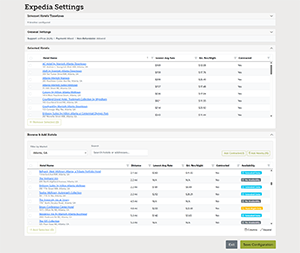
This enhancement brings the entire Expedia setup workflow into a single, streamlined interface, making it easier and more efficient to configure and manage Expedia hotels for your events.
For the first time, users can manage settings, timelines, hotel discovery, and hotel selection all in one place—eliminating the need to navigate between multiple pages and creating a more seamless experience from start to finish.
What’s New
- Real-time Expedia data with immediate visibility into live rates and estimated revenue per night
- Enhanced hotel details and filtering capabilities to support faster, more informed hotel comparisons
- Availability indicators that quickly show hotel coverage across event dates
- Bulk Quick Add actions for contracted and nearby hotels
- Pre-configured default settings to help reduce setup time and simplify configuration
All Expedia setup components remain fully synchronized with the legacy Meeting Timelines and External Services pages (including both Compass Direct and Affiliate Hotels tabs), allowing users to confidently complete their workflow directly within the new experience.
This release marks the first step in a broader set of Expedia enhancements already underway, with additional improvements planned for future releases. The Product team will also be reaching out to a group of early users to gather feedback and help shape future iterations.
Compass Dashboard 2.0
We’re excited to introduce the next step in the evolution of Compass Dashboard. As part of the Compass Dashboard 2.0 experience, the new Event Overview page brings your event performance into sharper focus—combining powerful insights with a more intuitive and flexible user experience.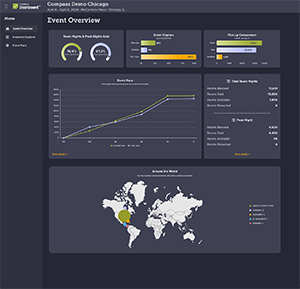
Designed to help you quickly understand performance while enabling deeper analysis, Event Overview provides access to key metrics and trends over time, dynamic filtering capabilities, and interactive visualizations that surface the insights that matter most. With a blend of enhanced favorites and brand-new reporting tools, you’ll have a clearer view of event performance at every stage of the attendee journey.
Event Overview also introduces a modernized navigation experience. A new side navigation menu makes it easy to move between pages and insights, helping you stay oriented and efficiently explore the growing Compass Dashboard ecosystem.
As Compass Dashboard 2.0 continues to evolve, this new experience lays the foundation for faster insights, smarter decisions, and a more connected view of event performance.
We’re already actively testing additional pages and features that will further expand the Compass Dashboard 2.0 experience, including:
- Capture Progress – A detailed view of capture performance across key categories and benchmark dates, with prior-year comparisons available where relevant to help identify trends and opportunities.
- Roster Explorer – A fully interactive roster experience that immediately exposes attendee data, allowing users to quickly filter, search, and take action without navigating through multiple screens.
Attrition Tracking – Direct visibility into attrition performance from the Event Overview page, with the ability to drill into detailed metrics and monitor progress.